
4. Preview CSV impact without importing it
Build this example in your Unreal practice project and check the result at each step.
On this page
Check which consumers would lose their destination before importing a candidate table through your normal workflow.
- Select
TargetsandConsumersagain, click Use selected DataTables, and loadFixtures/nullable-handles.json. - In the CSV panel, choose
Targetsas the candidate destination table and selectFixtures/Candidate.csv. - Once both inputs are selected, wait for the comparison to finish. The candidate CSV removes T1.
- Check the two current example errors and two additional
ROWTETHER-ROW-REMOVEDwarnings for C1 and C2, which use T1. - Open
Targets: T1 should still be there. The preview reads row keys and headers; it does not import the CSV or run import hooks. - Click Clear comparison to return to the findings from the current tables.
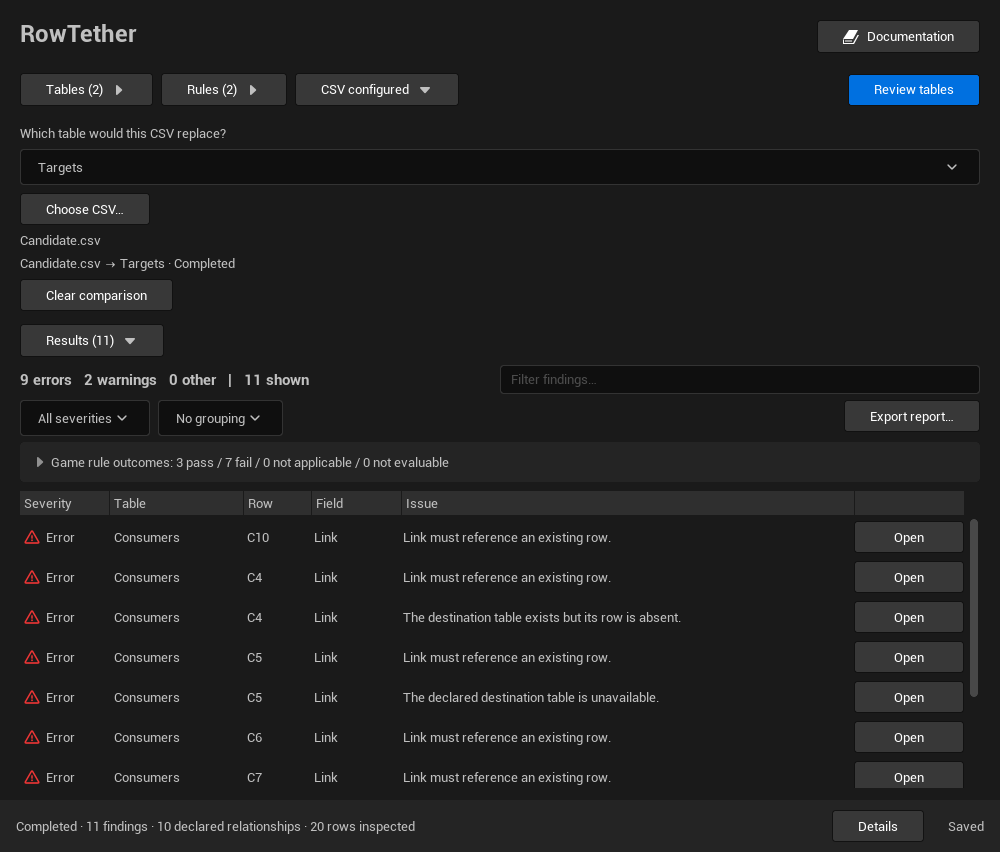
Do not read the warnings as if the row had already been removed. Review every consumer in scope before deciding whether to import the file.
If the comparison does not start, check that Targets is in the selected table list, is the candidate table and the CSV still has the Name header. Do not import Candidate.csv.