
2. Trigger an error and decide what the user will see
Build this example in your Unreal project and compare the result at each step.
2.1 Reject an explicit failed value
In this exercise you will create a failed value to learn how to handle a rejected assignment. Make Scientific Number Failure lets you choose the error the component receives. A normal number such as (1000, 0) is valid and normalizes to (1, 3).
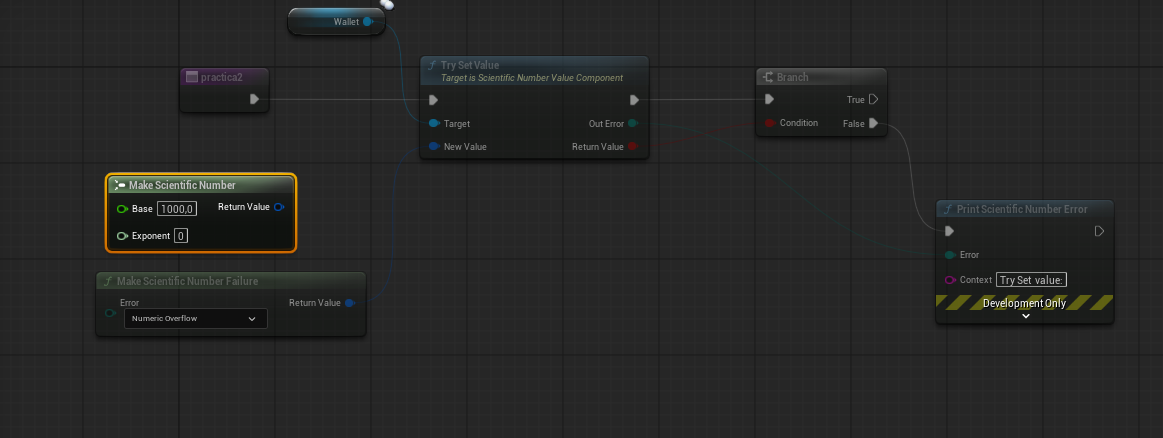
- In your practice Actor (for example, BP_MiNumero), add a Scientific Number Value Component named Wallet, if you do not already have one. Drag its reference into the graph.
- Add Try Set Value and connect Wallet → Target. Run it from BeginPlay or from your practica2 function; if you use a function, make sure you call it.
- Add Make Scientific Number Failure and select Numeric Overflow for Error. Connect its Return Value → New Value. Disconnect Make Scientific Number with Base 1000, Exponent 0 for this test.
- Connect Try Set Value execution to Branch, and connect its Return Value → Condition.
- Add Print Scientific Number Error. Connect False → Print execution and Out Error → Error. Enter Try Set value in Context, without a final colon: the node adds the separator. You can increase Duration in the advanced pins.
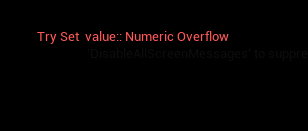
- Compile and run. Expected result: Return Value = False, Out Error = Numeric Overflow, and the red message Try Set value: Numeric Overflow.
The screenshots show how to connect the error branch and the message it displays:
Return to a valid value: reconnect Make Scientific Number (Base 1000, Exponent 0) → New Value. It should return True / No Error, store 1000, and print no error. To also check that a failure does not change the balance, first store 1000, then attempt the failed assignment and query Get Value: it should still be 1000.
If you only want to print errors, you can connect Try Set Value execution directly to Print, without Branch: No Error prints nothing when No Error Message is empty. Keep Branch when you need different success and failure actions. Print is for development only, not the final message in your interface.
2.2 Trigger an operation failure
- Create two Make Scientific Number nodes: (Base 2, Exponent 3) and (Base 0, Exponent 0). Connect them to Divide.
- Get Get Error from the result and connect it to Print Scientific Number Error → Error. Run Print from your event, with Context = Dividir.
- Division by Zero should appear. Here, division causes the failure, not Make Scientific Number Failure.
- Change the divisor to (Base 2, Exponent 0): the result should be 1000, Is Success = True, and the error Print should remain silent. You can show the result with Print Scientific Number.
Also try (Base 1.25, Exponent 400) with Try To Double: the scientific number is valid, but conversion returns False / Overflow. Connect its Out Error to Print.